
The Benazir Income Support Program (BISP) is one of Pakistan’s most important welfare programs. It is designed to help those in need, particularly low-income families. The BISP 8171 service allows beneficiaries to check their payment status online. This guide will provide a simple and clear explanation of how you can check the BISP 8171 payment status online.
What is BISP?
BISP is a government initiative that provides financial assistance to disadvantaged families. It aims to reduce poverty and improve the living standards of those who are less fortunate. Through BISP, families receive a direct cash transfer to help cover their essential needs such as food and health care.
The BISP 8171 service is an online platform that allows beneficiaries to check the status of their payments. This online tool is easy to use and provides real-time information about the status of your payment.
Why Check Your BISP 8171 Payment Status?
Checking the BISP 8171 payment status is essential for beneficiaries. Here are a few reasons why you should regularly check your payment status:
- Stay updated: Knowing the status of your payment ensures you are aware of when to expect your cash assistance.
- Avoid delays: If there is any issue with your payment, checking the status helps identify problems early.
- Peace of mind: It gives you confidence that you are receiving the benefits you are entitled to.
How to Check BISP 8171 Payment Status Online: A Step-by-Step Guide
Checking your BISP 8171 payment status online is simple. Follow these easy steps:
Step 1: Visit the Official BISP Website
To begin checking your payment status, you need to visit the official BISP website. You can do this by typing https://8171.bisp.gov.pk into your web browser’s address bar.
Step 2: Enter Your CNIC Number
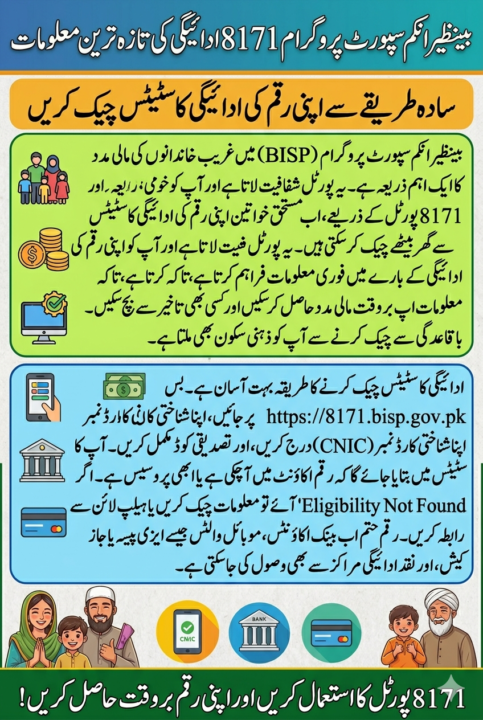
Once you’re on the website, you will be prompted to enter your CNIC number (Computerized National Identity Card number). This number is unique to every Pakistani citizen and is essential for verifying your identity.
Step 3: Verify Your Information
After entering your CNIC number, you may be asked to verify your information. This could include a captcha to confirm that you are not a robot. Make sure you fill in all details correctly before proceeding.
Step 4: Check Your Payment Status
Once you have successfully entered your CNIC number and verified your information, the website will display your BISP 8171 payment status. You will see whether you have received your payment or if there are any pending issues.
Step 5: Download or Take a Screenshot
If you want to keep a record of your payment status, you can either download a PDF or take a screenshot of the page. This will serve as proof of your payment status.
Common Payment Status Messages You May Encounter
When you check your BISP 8171 payment status, you might see several messages. Here are the most common ones and what they mean:
- “Payment Disbursed”: This means your payment has been successfully processed and sent to your bank account or mobile wallet.
- “Payment Pending”: This indicates that your payment is still under processing. You should check back later.
- “Eligibility Not Found”: If this message appears, it means that the system cannot find your information. It could be due to an incorrect CNIC or missing data.
- “Not Approved”: This message means that your application for BISP assistance has been reviewed but not approved for payment.
Read More: University Launches Electric Bus Service for Student Commute
Troubleshooting Common Issues
While checking your BISP 8171 payment status is generally straightforward, you may encounter some issues. Here’s how to troubleshoot common problems:
1. Incorrect CNIC Number
If you enter the wrong CNIC number, the system will not be able to retrieve your payment status. Double-check that the number you entered is correct.
2. No Internet Access
Ensure you have a stable internet connection when checking your payment status. Without it, the page might not load correctly.
3. System Maintenance
Sometimes, the BISP website might be down for maintenance. If you cannot access your payment status, try checking back after a few hours.
4. Eligibility Issues
If you see a message stating “Eligibility Not Found,” ensure that your details are correctly entered in the system. If the problem persists, you may need to contact BISP’s helpline.
BISP Payment Methods
There are several ways in which BISP beneficiaries can receive their payments. These include:
- Bank Accounts: Payments are transferred directly to the bank accounts of eligible beneficiaries.
- Mobile Wallets: For those without bank accounts, payments may be made through mobile wallets like JazzCash or EasyPaisa.
- Cash Disbursement Centers: In some cases, beneficiaries can collect their payments from designated cash disbursement centers.
Make sure your payment method is updated in the system for smooth transactions.
Latest Updates on BISP 8171 Payment Status
BISP is continuously improving its services. Recently, they introduced a few updates to make the payment process easier:
- Faster Processing Times: Payment processing times have been reduced, so beneficiaries now receive their payments more quickly.
- Mobile App for Payment Tracking: BISP has introduced a mobile app for easier access to payment status and other services.
- Real-Time Payment Notifications: Beneficiaries now receive notifications when their payments are processed.
BISP 8171 Payment Status: A Helpful Table
| Status Message | Meaning |
|---|---|
| Payment Disbursed | Your payment has been successfully transferred. |
| Payment Pending | Your payment is still being processed. |
| Eligibility Not Found | No records found for your CNIC in the system. |
| Not Approved | Your payment application has not been approved. |
Conclusion
Checking your BISP 8171 payment status online is an essential task for ensuring you receive the benefits you are entitled to. By following the simple steps outlined in this guide, you can easily check your payment status and stay informed. If you encounter any issues, refer to the troubleshooting tips to resolve them quickly.
Make sure to visit the official BISP website regularly for updates on your payment status. This ensures that you do not miss out on the assistance provided by the Benazir Income Support Program.